Stock Register: Know what is on the rack. Order before it finishes.
Stock is received and issued on the phone as the material moves, so the screen shows what is on the rack. Low and finished items go on the reorder list by themselves, with a suggested quantity for your purchase person.
- Demo on your own data before you pay
- Live in two weeks
- Fixed price, from ₹25,000
- Works on any phone
Sample data: Jai Ambe Hardware is an invented hardware wholesaler in Sadar Bazar, Delhi. No signup. Nothing is saved.
Press a number to see that part, or press the picture to open the working demo with sample data. Nothing is saved. Open it full screen · Set up for Wholesalers & distributors, Manufacturers
How it runs today
- Tally shows 200 pieces and the rack has 140, and nobody can say where the rest went.
- You find out an item is finished when a customer is standing at the counter.
- Material leaves the godown on a verbal instruction, and the entry is made later or never.
- Stock is counted once a year, and the difference is written off without a reason.
- The same item gets ordered twice, while another one that sells every day is not ordered at all.
How work moves through it
- 1Each item is set up once, with its unit, godown, rack and reorder level
- 2Material that comes in is received on the phone, with the supplier name
- 3Material that goes out is issued on the phone, with the party it went to
- 4An item that falls to its reorder level goes on the reorder list with a suggested quantity
- 5After a physical count the balance is corrected with a reason, and the difference stays on record
Every part, spelled out
Stock list
Every item with its balance, godown, rack and reorder level. Filter by low, out of stock or godown.
Receive and issue
Two buttons on every item. Each entry saves the quantity, the party and the person who made it.
Movement register
Every in and out with a name and a time against it. It is the register page, and you can search it.
Reorder list
Items at or below their reorder level, with a suggested quantity. One tap sends an item to your purchase person on WhatsApp.
Physical count
Correct the balance after counting, with a reason. The differences stay on record, item by item.
Daily report
One message to the owner: what came in, what went out, what is finished and what is about to finish.
Made for businesses like yours
Wholesalers and distributors
With one or two godowns, hundreds of items, and stock that moves all day on calls and challans.
Small manufacturers
Who keep raw material, consumables and finished goods in a store that one person runs from a register.
Owners who do not trust the stock figure
Who walk to the rack to check before promising a quantity to a customer.
What you get, and when
- Your items, units, godowns, racks and reorder levels set up
- Opening stock loaded from your Excel, register or a Tally stock summary
- Stock list, receive and issue, movement register, reorder list and the daily report
- The reorder message to your purchase person in your wording
- Logins for the godown staff and the owner, with training at the godown
- One month of care after go-live, with fixes and small changes
Why the stock figure is never right
In most godowns the material moves first and the entry is made later. A dealer calls, the helper takes out forty pieces, and the challan is made in the evening or the next day. Tally shows stock as per the bills, not as per the rack. So the owner checks the rack before promising a quantity, and learns that an item is finished when a customer asks for it.
What changes
- Receiving and issuing are entered on the phone at the moment the material moves.
- Every entry carries the quantity, the party and the name of the person who made it.
- Each item has a reorder level. When the balance reaches it, the item goes on the reorder list with a suggested quantity.
- A low item goes to your purchase person on WhatsApp in one tap.
- After a physical count the balance is corrected with a reason. You can see which items differ again and again.
- The owner gets one report in the evening.
What it does not do
It is not GST billing, and it is not an accounting stock ledger. Invoices, e-way bills and stock valuation for the books stay in Tally or Busy, and this works beside them. It also cannot make an entry for a person who did not make it. The balance is only as correct as the entries. That is why the staff screen is kept to two buttons, and why the physical count is part of the routine.
What we need from you
- Your item list with units, as an Excel file or a Tally stock summary
- The stock in hand today, counted by your staff for the items you want to start with
- A reorder level for the fast-moving items. The others can be set later
- The person who handles the godown, for an hour of training
One fixed price to set up. A small fee to keep it running.
No per-user charge. You see a demo on your own data before you pay anything.
Starter system
One process, set up for you and live in two weeks.
- A working demo on your own data before you pay
- Scope and price on one page
- Your current data loaded and your staff trained
- First month of care included
Care plan
Keeps the system running. Starts from the second month.
- Backups and uptime watched
- Faults fixed
- Two small changes a month
- Reply by the next working day
System Partner plan
For when your daily work runs on the system.
- Up to 8 hours a month of new reports, automations and changes
- A weekly report to the owner
- A monthly review call
- Training for new staff
How the plans work
- Half the setup price to start, the rest before go-live.
- The monthly fee is paid at the start of the month.
- Hours are written down. Unused hours do not carry over.
- First term is three months, then 30 days notice either way.
- Extra work is quoted before it starts.
What is not included
- Daily follow-up with your staff. One person on your team does that, and we train them.
- New modules and new integrations. Each gets its own quote.
- Cleaning old data beyond the first import.
- WhatsApp tool charges. You pay the tool directly, about ₹500 to ₹2,800 a month plus message charges.
Add-ons
Each has its own quote.
- A first reply to every WhatsApp enquiry within a minute, then follow-up for seven days
- Payment reminders sent from your own sheet on the days you choose
- Bills read into your sheet or Tally, checked by a person before saving
Before you ask
Tally already has stock. Why do we need this?+−
Tally stock changes when a bill is entered, often hours or days after the material has moved. This is the godown register: the entry is made on the phone when the material moves. GST billing and the accounting stock ledger stay in Tally or Busy.
Does it make GST bills or e-way bills?+−
No. It is not billing software. Invoices and e-way bills are made in Tally or Busy as today. An issue entry here can carry your challan number, so the two can be matched.
Who makes the entries?+−
The person who handles the material: the godown keeper or the store person. Receive and issue are two buttons and a quantity. We train them at the godown.
What if the screen and the rack still differ?+−
It will happen, mostly from entries that were missed. You count the item, correct the balance with a reason, and the difference stays on record. Counting a few items every week keeps the gap small.
How long does it take to start?+−
About two weeks for one process, including loading your current data and training your staff. You first see a demo on your own data, before you pay anything.
What does WhatsApp cost?+−
Messages that go out by themselves use a WhatsApp Business tool that you pay for directly, about ₹500 to ₹2,800 a month plus a small charge per message. We set it up on your own number. Tap-to-send messages from your phone cost nothing extra.
Is it charged per user?+−
No. The setup has one fixed price and the monthly plan is flat. Add as many staff as you have.
Where is our data kept?+−
Your quote explains the two options: on a server we run for you, or on your own server. Either way the data is yours and you can export it at any time.
The practical bits
Guides on this subject
Often set up next

Order & Payment Tracker
See which order is stuck, what goes out today and who owes you money, on one screen. Payment reminders go out on WhatsApp.

Production Job Tracker
Job cards move from material to packing on one screen. A stuck job carries its reason, machines show running or down, and sales gets the new date on WhatsApp.
Purchase & Vendor Follow-up
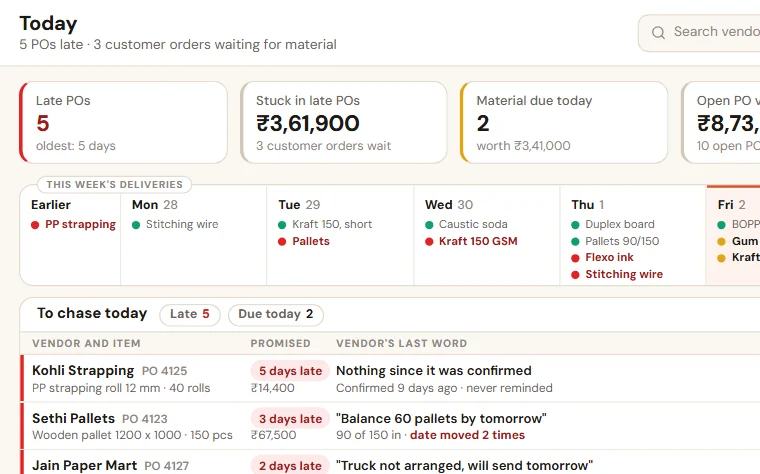
See which material is late, which vendor has moved the date and which customer order is waiting for it. Reminders go to vendors on WhatsApp.
See Stock Register on your own data
Share last month of your data. We come back with a working demo, then a fixed price on one page.